Four Simple Collaboration Patterns
There are only a handful of shapes these systems take, and you have seen every one of them before — in relay races, at reception desks, in project teams, and in the cockpit of an aeroplane.
There are only a handful of shapes these systems take, and you have seen every one of them before — in relay races, at reception desks, in project teams, and in the cockpit of an aeroplane.
We will take them one at a time. For each: the everyday version first, then a simple example, then the diagram, then the word the industry uses for it.
One after another
Think of a relay race, or an assembly line. One person completes a step and passes the result to the next. Nobody does the whole job, and nobody works at the same time as anybody else.
A simple example
A customer email arrives.
- The first agent reads it and identifies what the problem actually is.
- The second looks up the company policy that applies to that problem.
- The third drafts a reply using both.
- A person reads the draft before it is sent, where the situation warrants it.
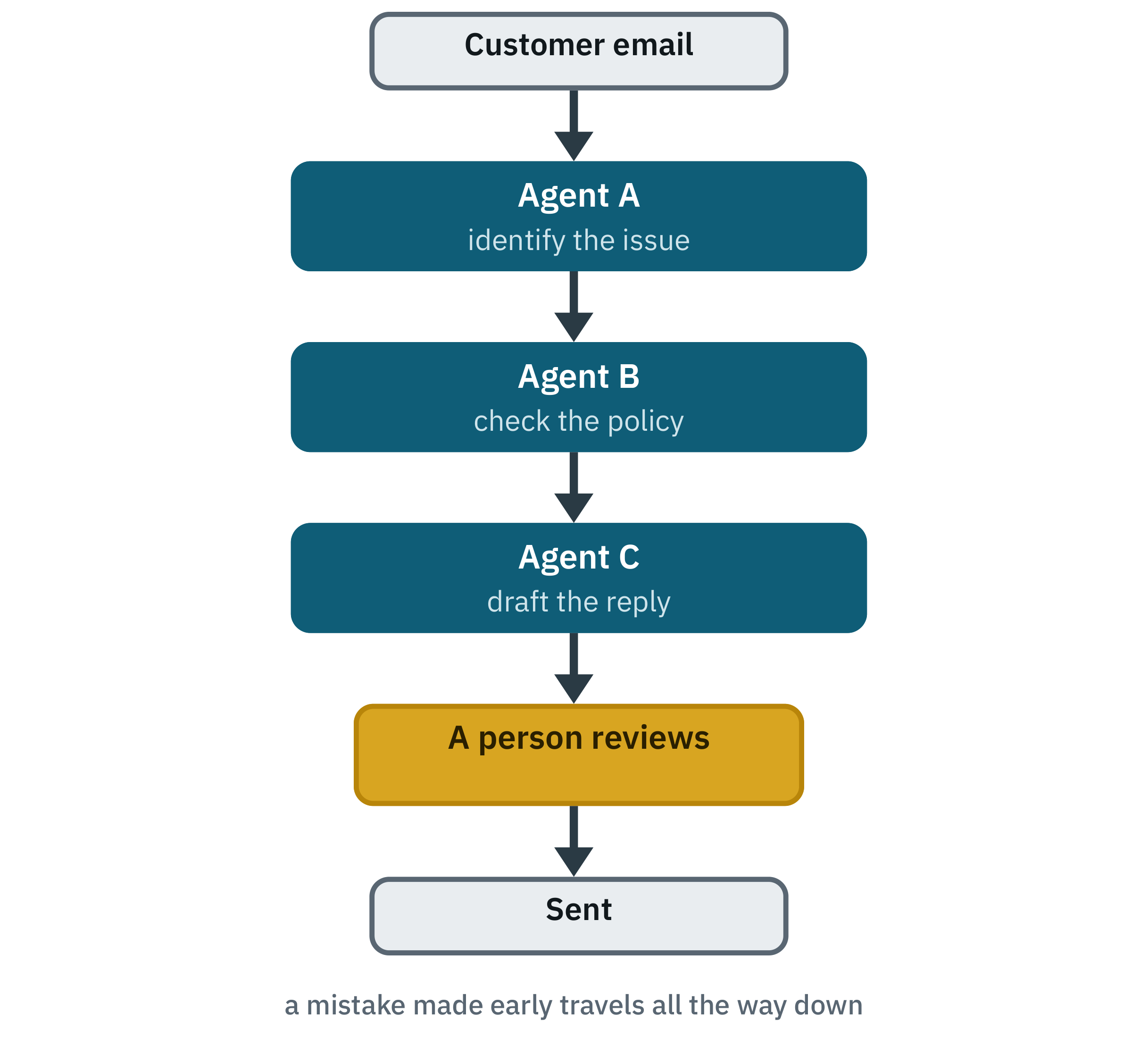
This arrangement is usually called a pipeline.
When it works, and where it breaks
It works when each stage has a clear job, when the order genuinely matters, and when each stage produces something clean for the next one to use. Extract, then analyse, then summarise. It is the easiest of the four to reason about, because you can point at exactly where a given piece of work is.
Where it breaks: a mistake early travels all the way downstream, and gets harder to spot with every step. And every handover is a chance to lose context that the next stage turns out to need. A four-stage pipeline has three of those chances.
Sending each request to the right specialist
Think of a receptionist, or an information desk at a large office. They do not solve your problem. They work out whose problem it is, and point you at them.
A simple example
A university student services system. A student asks something, and the request goes to whoever should handle it:
- “Why was I charged this fee?” → the finance agent
- “Can I change my course?” → the registration agent
- “My account will not log in.” → the IT agent
- Anything unclear, unusual or sensitive → a member of staff
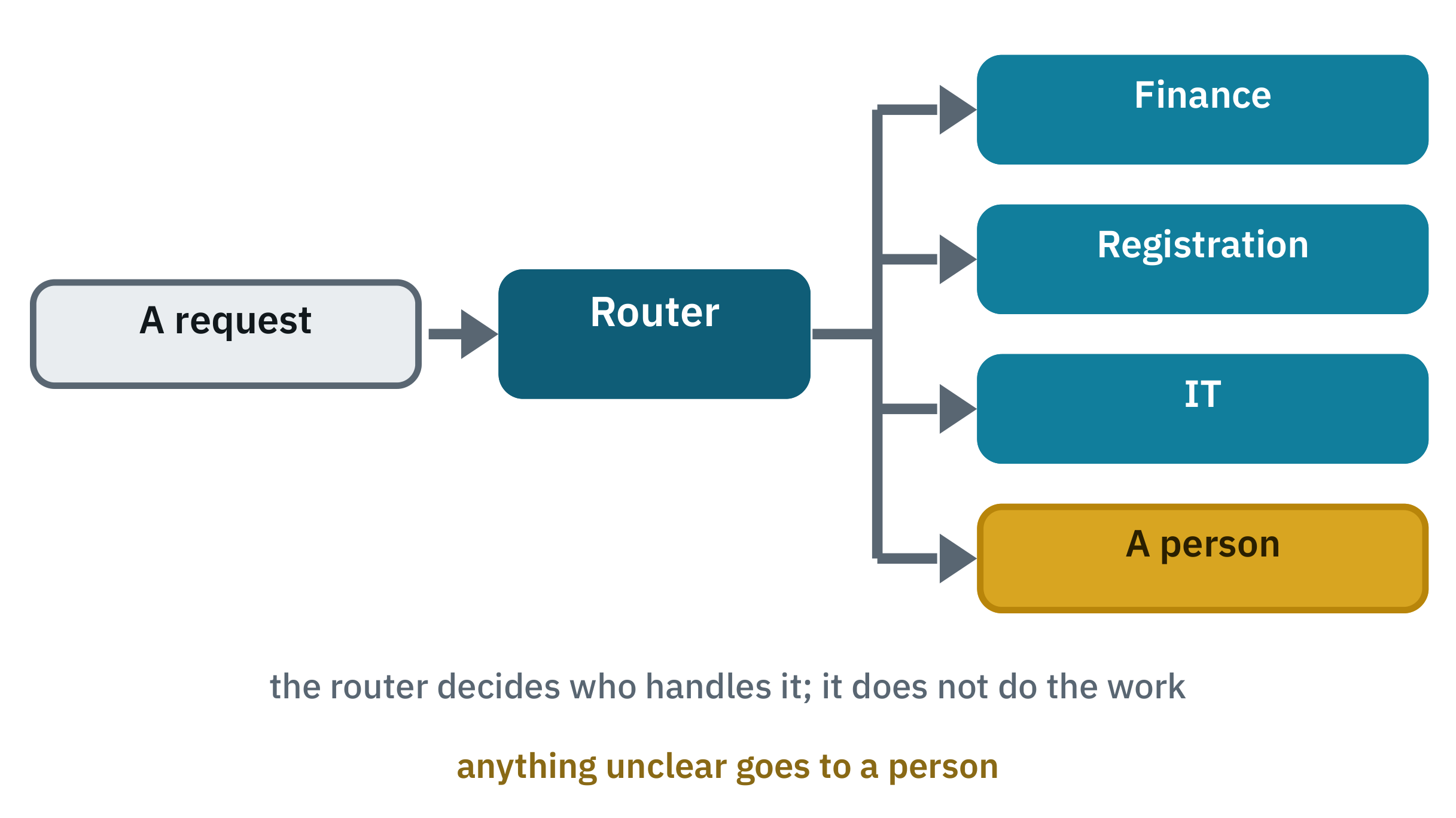
The component that makes the decision is called a router. The essential thing about it: a router chooses who handles the request. It does not do the work, and there is no step at the end that combines anything, because one specialist handled the whole thing.
When it works, and where it breaks
This is the cheapest, fastest and most predictable of the four, and it is where most projects should start. Each specialist can be narrow, with only the tools and permissions its own job needs — the finance agent can see the payments system and nothing else.
That last route in the list is not a failure case; it is the most important line in the design. A router with nowhere to send the unclear cases will force every request into a category, and the forced ones are precisely the ones that go wrong.
You can also route by difficulty rather than by subject: straightforward requests to a small fast model, hard ones to the most capable. This is invisible to the user and it is where a great deal of the cost saving in real systems comes from. Chapter 11 showed it in action, with a capable model leading and cheaper ones underneath.
Building the router itself, in increasing order of cost: a set of rules, which is free and instant and brittle at the edges but often right for most traffic; a small fast model picking from a fixed list of categories, which handles phrasing that rules miss; or the main model deciding, which is the most flexible and the most expensive. A practical arrangement is rules first, a small model for the remainder, and a person for anything still unclear.
A team working at the same time
Think of a team leader handing different jobs to several people at once, then pulling their work together into one deliverable. Nobody is waiting for anybody else.
A simple example
Back to the trip. The user asks: “Plan a three-day trip to Barcelona.”
The coordinator works out that this comes apart into three independent questions, and asks three specialists at once:
- The flight specialist compares flights.
- The hotel specialist compares hotels.
- The local specialist checks weather and how you get around.
They work without needing to know what the others found. The coordinator then combines all three into one trip plan.
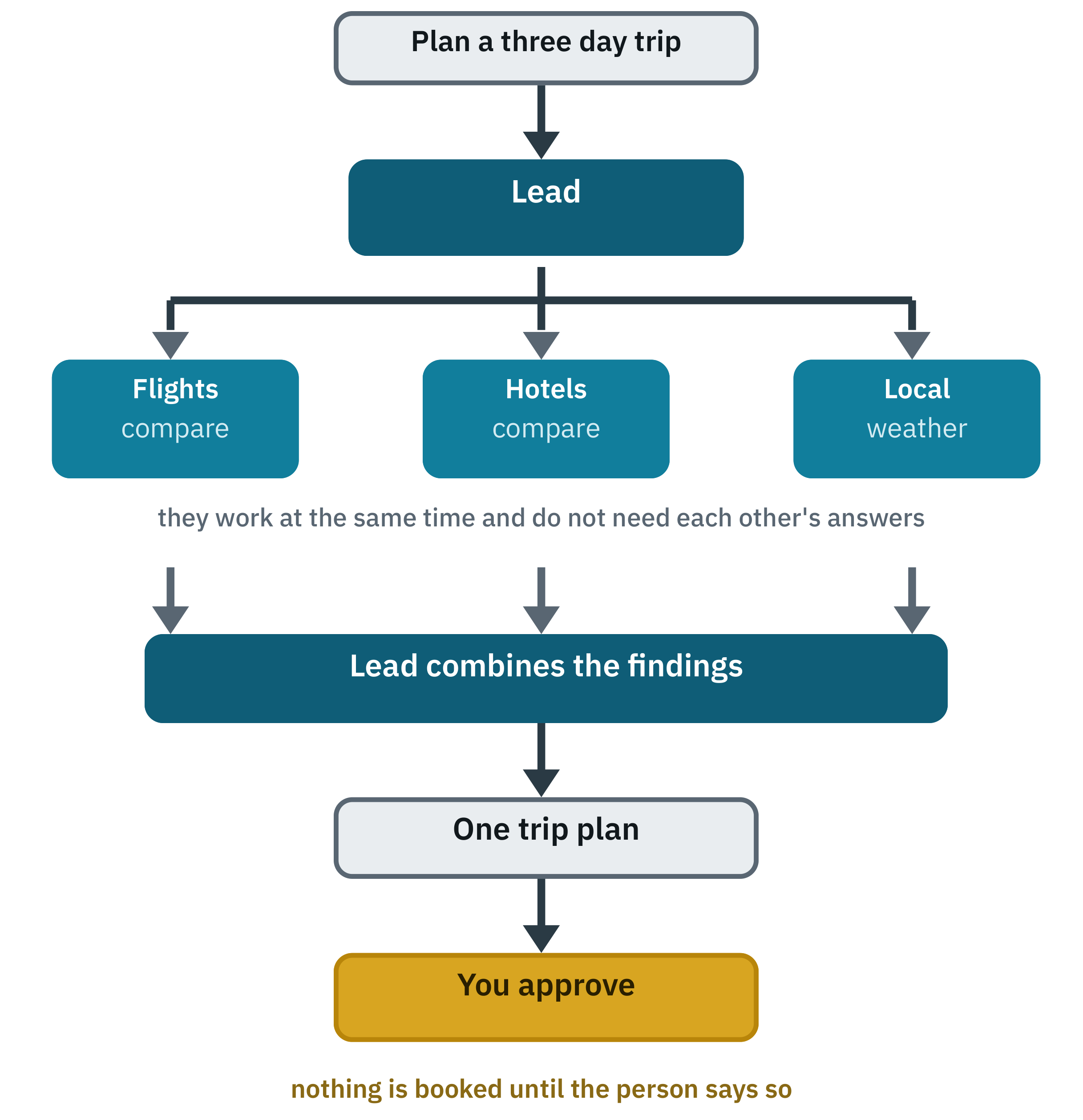
Now the vocabulary, all of which you met in Chapter 11. The coordinator is an orchestrator. The specialists are workers, or subagents. Their working at the same time is parallel execution.
The distinction that matters most
These two patterns get confused constantly, so it is worth stating as plainly as possible:
A router chooses one specialist to handle the request. An orchestrator divides one larger task among several specialists and combines their work.
The receptionist sends you to the finance office and their job is done. The team leader breaks the project into three assignments, waits for all three, and then has to write the report. Different jobs, different costs, different failure modes.
When it works, and where it breaks
It works when the parts are genuinely independent and there is real volume to get through — which is exactly the research case from Chapter 11.
Where it breaks: it is the most expensive of the four, it is the hardest to debug because there is no single conversation to read, and it fails in a particular way that is worth knowing about in advance. If two specialists are given vague, overlapping assignments, they will do the same work twice and leave a gap between them that nobody covers. Which is why the next section exists.
Giving an assignment properly
Vague delegation accounts for most disappointment with these systems. “Research the competitor”, given to three agents, produces three agents reading the same three articles.
A usable assignment names four things:
What to find: the published capital expenditure figures for the three largest chip manufacturers, for last year and the year before.
What to send back: one row per company — name, year, figure, link to the source.
Where to look: annual reports and official filings first. Use news coverage only to fill a gap.
What is not yours: do not cover design firms or equipment suppliers. Another specialist has those.
The last line is the one people leave out, and it is the one that prevents duplication. Every worker should know what is not its job.
The person as part of the design
Think of a co-pilot. The AI does the work; a person makes the decision that matters.
A simple example
Booking a flight, which we have been circling since Chapter 1.
The AI: finds the flights, compares price and timing against your stated preferences, prepares the booking.
The person: reviews it, chooses, approves the purchase.
Then the AI: completes the action it has now been permitted to take.
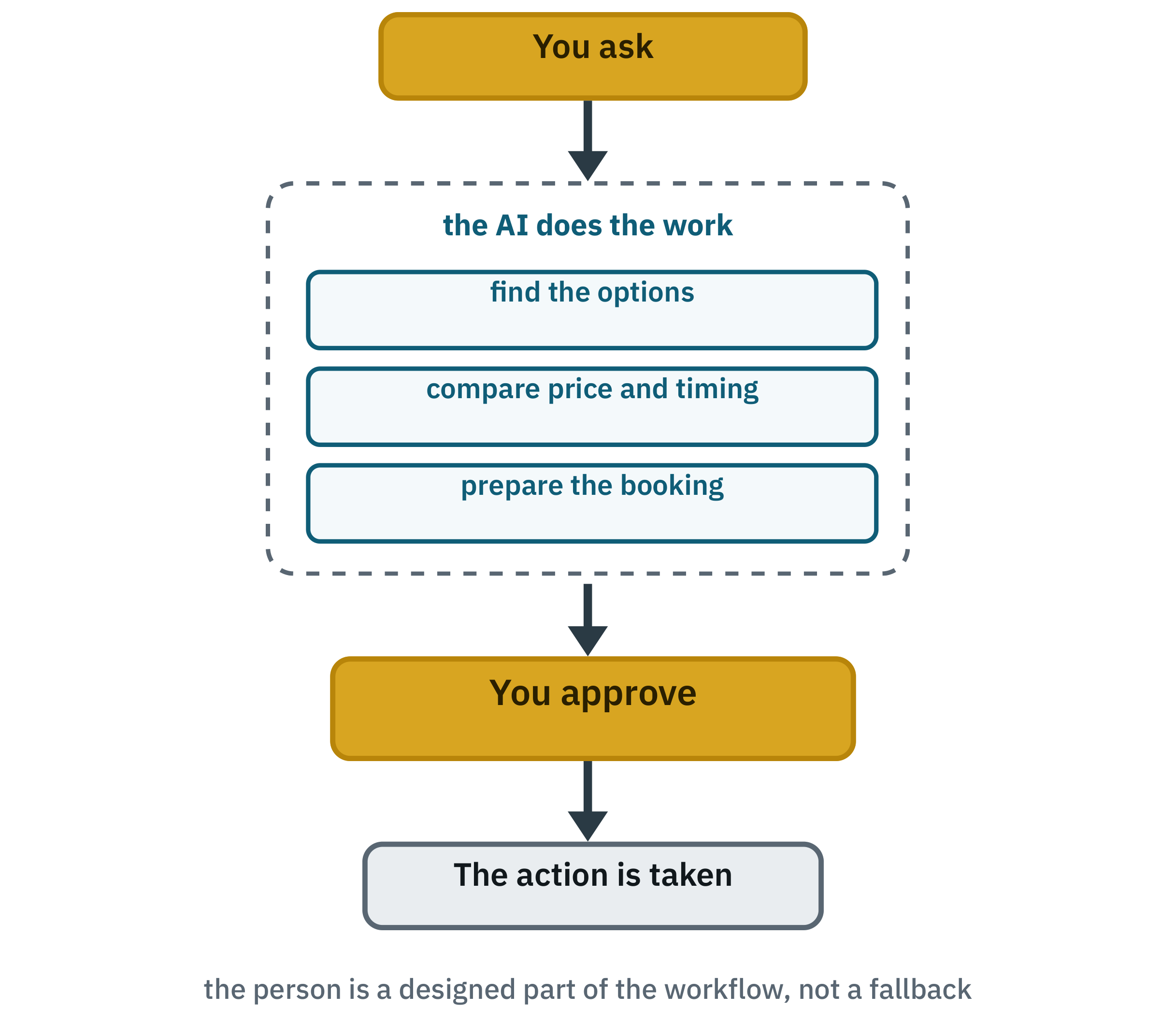
Be clear about what this is. A person plus one AI agent is not a multi-agent system, and calling it one confuses the vocabulary. But it belongs in this chapter anyway, because it is one of the most important ways agentic systems are actually designed in practice — and because it combines with all three of the patterns above.
Humans are not only an emergency fallback. They can be a designed part of the workflow.
That is a different claim from “keep a human in the loop for safety”, and a more useful one. The person in this pattern is not a brake. They are the component that holds the authority to commit, because they are the one who will live with the consequence. Part VI is about what it takes to move that boundary, and why you should not move it casually.
Passing work between agents
A handoff is any point where work moves from one agent to another. Every pattern above has them: three in a pipeline, one layer in a coordinated team, one in a router.
A handoff can carry any of several things, and it is worth deciding which:
- structured data;
- a short summary;
- a pointer to a shared document;
- the complete result;
- the state of the task so far.
The lesson to hold onto, and it applies to every one of those:
Every handoff is a place where information can be lost or misunderstood.
Two things help. The first is to keep the chain short. A coordinator with four workers has one layer of handoffs. Four agents in a line has three. Prefer breadth to depth — which, as Chapter 11 noted, is why shipped systems cap how deep delegation may nest.
The second is easier to see with an example than a principle. Suppose one agent has produced a fifty-page report and the next one needs it. Copying the whole thing into a message is wasteful and pushes everything else out of the way. Summarising it loses detail the next agent may need. So instead: save the report somewhere, and tell the next agent where it is.
The technical phrasing of that is pass references, not payloads, and it is one of the highest-value habits in this whole part of the book. The coordinator's context stays clear. The detail is not lost to summarising, because it was never summarised. It is simply somewhere else, in full, until someone needs it.
Knowing when to stop
An agent loop needs an explicit stopping rule. Left without one it will keep searching, keep refining, keep sending out more work — not because it is eager, but because nothing in the loop tells it that enough has been done.
Write the condition down. Useful ones:
- The task is complete against a definition you wrote in advance.
- Enough evidence has been collected to answer, as opposed to all the evidence that exists.
- The maximum number of attempts has been reached.
- Nothing new is appearing. If a round adds nothing, stop.
- A person needs to look at it.
Underneath those, in production, sit hard limits: a cap on tool calls, on agents, on tokens spent. Those are not the stopping condition — they are the backstop for when the stopping condition fails. If your runs always end at the budget cap, your stopping condition is not working.
The second bullet deserves a moment. “Do I have enough to answer?” is a question the coordinator can be asked explicitly. “Could I find more?” is not, because the answer is always yes.
This can produce genuinely better work, and it is the hardest of all these arrangements to control, because the natural stopping point is not obvious. Any loop like this needs three things stated up front: an explicit stopping rule, a hard limit on rounds, and criteria the reviewer is actually judging against. Without them, two agents will converge on politely agreeing with each other and carry on regardless. Worth knowing about; not worth reaching for early.
Being able to see what happened
One practical consequence of all this. A single agent can be debugged by reading the conversation. A system with several agents cannot, because there is no single conversation, and the path may differ between runs.
So record: the plan the coordinator produced, which workers were sent out and with what assignments, which tools each called and what came back, what each returned, where the run stopped and why, and what it all cost.
With that, a bad answer is diagnosable — the assignment was ambiguous, or a tool returned nothing, or a finding got dropped when the results were combined. Without it you are guessing, and because the same request may take a different path next time, you may not be able to reproduce the failure at all.
One caution: these records contain whatever the system was working with, which may include personal data. Log the structure and the decisions, and be deliberate about how much content you keep and for how long. Chapter 15 returns to it, and Chapter 16 shows why these records turn out to be the most valuable thing you have.
Key takeaways
- Four shapes: one after another, sent to the right specialist, a team working at the same time, and a person in the decision path.
- A pipeline is easy to follow, but mistakes travel downstream.
- A router chooses a handler; it does not do the work. Always give it somewhere to send the unclear cases.
- An orchestrator divides one task among several and combines their work. That is the distinction from routing.
- An assignment needs what to find, what to send back, where to look, and what is not yours.
- Human-augmented is not technically multi-agent, and is one of the most important designs in practice.
- Every handoff is a place information can be lost. Keep chains short and pass references rather than payloads.
- Agent loops need explicit stopping rules. Budgets are the backstop, not the rule.
- You cannot debug several agents by reading. Record what happened.
Four patterns, and a set of habits for making them behave. What none of that tells you is whether the system in front of you needs any of it. So let us take one ordinary request and design it properly — and then ask, honestly, whether it needed a team at all.