ChatGPT and Claude: From Conversation to Action
You have almost certainly had this experience. You asked an assistant something it could not have known — what happened at a conference last week, what a company's current pricing is — and instead …
You have almost certainly had this experience. You asked an assistant something it could not have known — what happened at a conference last week, what a company's current pricing is — and instead of guessing, it went away for a few seconds and came back with an answer and some links.
Something happened in those few seconds. This chapter is about what.
And you have probably had the other experience too. You asked something simple and the answer appeared instantly, with no searching, no links, no pause. Same window, same product, completely different machinery underneath. Nothing on the screen told you which one you got.
What these systems actually are
A careful definition, because loose language here causes confusion later.
Claude and ChatGPT are best described as general-purpose AI systems that can include agentic capabilities such as search, tool use and memory. They are not “agents” by definition, and what is available varies by product, by version and by your own settings. Sometimes you are having a single exchange with a model. Sometimes the same interface is running a multi-step loop with tools. The interface does not tell you which.
Which is exactly the point Chapter 5 made from the other direction. A chat window is a surface. What sits behind it may or may not be pursuing a goal.
What makes these systems interesting is that they are built to work with a person. They do not operate in a vacuum: they take your question, use tools, come back with something, and then take your correction. That loop — you ask, it acts, you respond — is the whole design, and it is worth noticing that the person is a component rather than a spectator.
What happens in those few seconds
Walk through it as the system experiences it. You have asked for a summary of recent policy changes in some field.
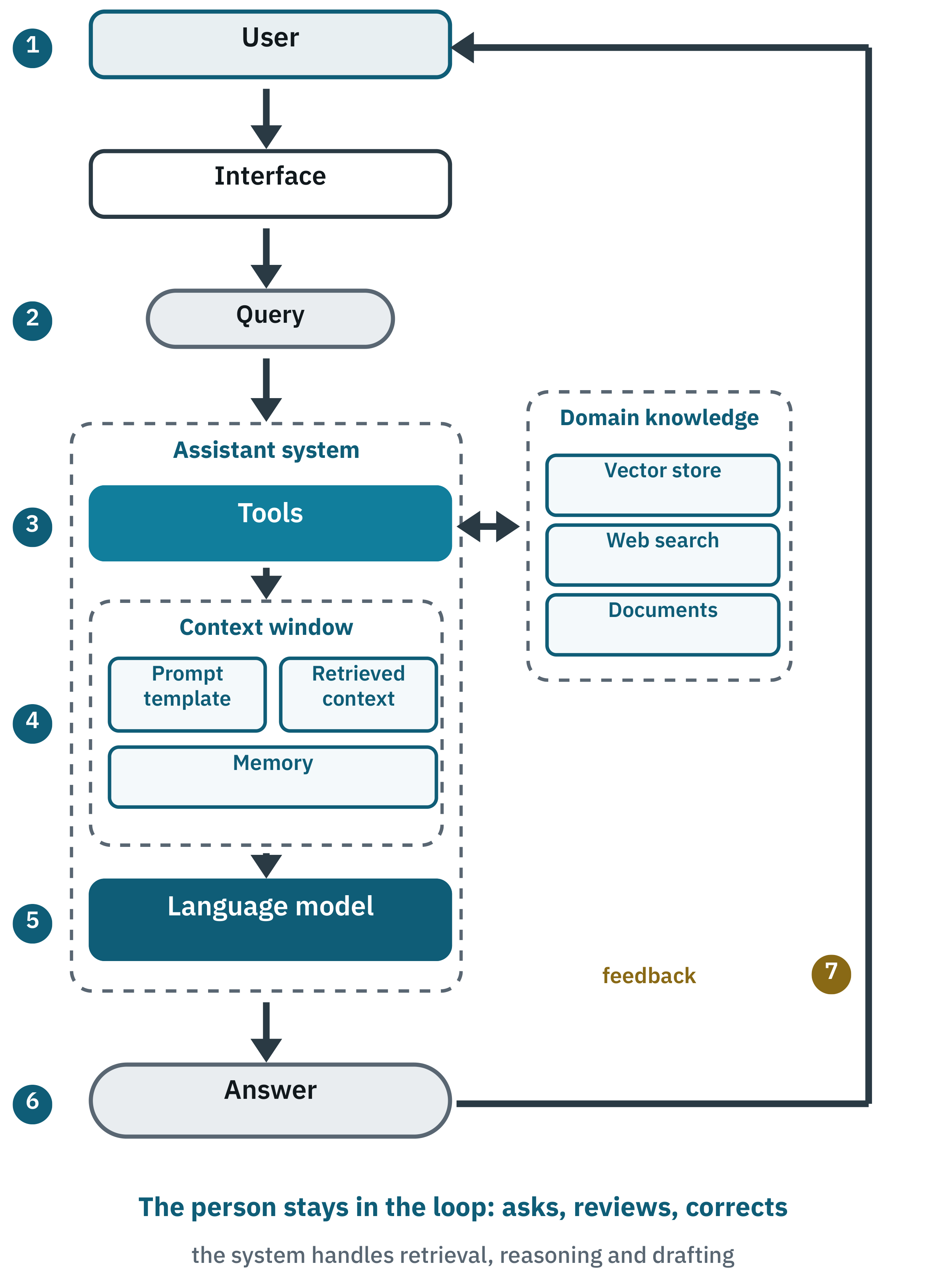
- You ask, through whatever interface you are using.
- The system turns your words into a query. It works out what kind of request this is, and whether it needs current information at all.
- It reaches out through its tools to the sources it can see — and the searches it runs are usually not the words you typed.
- What comes back is assembled into the context, alongside your prompt, the earlier conversation, and anything the system retains about your preferences.
- The language model reads all of it and writes an answer.
- The answer comes back with its sources, so you can check it.
- You react, and that shapes what happens on the next turn.
The name for this arrangement is multi-step orchestration — something deciding, in sequence, which capability to use next. It is what lets a system handle a real question rather than a well-formed one.
Figure 12 numbers those same seven steps, so you can follow the sequence through the parts of the system that carry it out.
What tools add
What separates these systems from a plain text box is what they can reach.
- Search, to retrieve documents and current material.
- Connections to other software, for structured things such as weather, calendars or mail.
- Stores of meaning, for search by relevance and for memory.
- Code execution, to compute an answer rather than estimate it. Asked to analyse a spreadsheet, a system with this can actually run the calculation instead of describing how one would.
- Planning, to decide what to do next.
Ask for a summary of a regulatory change and the system searches connected sources, selects the most relevant, hands them to the model and writes a summary you can check against the citations. Every one of those steps was designed by somebody.
The first answer is a draft
Even a strong system misses. That is why your reaction is part of the architecture rather than a courtesy:
- A signal that an answer was useful or not.
- A correction: no, I meant AI rules in healthcare.
- A clarification that narrows the scope.
In some products this informs future versions, subject to the provider's policies and your settings. In the immediate session it does something more direct: it runs the query again with a different search or a sharper instruction. That is why the second answer is so often much better than the first, and why the most effective users of these systems treat the first answer as a starting point rather than a verdict.
Building the smallest version of this
Everything above can be assembled from about twenty lines. What follows shows the structure: one tool, one model, one request. It is not a production system, and you can skip it entirely without losing anything — the point is only to show that there is no magic in the box.
Read it as three steps. First, describe a tool the agent is allowed to use. Second, hand the agent a model and that list of tools. Third, ask it something it cannot answer from memory, and let it decide whether to reach for the tool.
Optional Technical Example — Listing 1: an agent that can search
from langchain.agents import create_agent
from langchain.tools import tool # 1) Define a tool the agent is allowed to call.
@tool
def web_search(query: str) -> str: """Search the web for up-to-date information.""" # Plug in any search provider here. return search_provider.run(query) # 2) Build the agent: a model plus the tools it may use.
agent = create_agent( model="anthropic:claude-sonnet-4-5", tools=[web_search],
) # 3) Ask something that needs current information.
result = agent.invoke( {"messages": [{"role": "user", "content": "Find three recent advances in renewable energy."}]}
) print(result["messages"][-1].content)
Two things in that listing are worth more than the syntax. The tool has a written description, and the model decides when to call it by reading that description — which is why Chapter 8 insisted you write them carefully. And the list of tools is explicit: the agent can use those and nothing else. That single line is a permission boundary.
search_provider.run(query) stands in for whichever search service you choose. Library interfaces change between versions, so check the current documentation before building on this. A production version would add error handling, a limit on how many times tools may be called, and validation of what comes back. Key takeaways
- Claude and ChatGPT are general-purpose systems that can include agentic capabilities. They are not agents by definition.
- The same window may run a single exchange or a multi-step loop, and will not tell you which.
- Multi-step orchestration is what lets them handle a messy real question.
- Tool descriptions drive tool choice. Write them carefully.
- The explicit list of tools an agent may use is a permission boundary.
- Lower temperature means less variation, not more truth.
- Your correction is part of the design. Treat the first answer as a draft.
That is the general shape, described from the outside. It leaves a more interesting question unanswered. When one of these systems is handed something genuinely large — a research question that means reading hundreds of sources — does it just keep looping faster? Or does it do something else entirely?