Start With the Problem
Here is the thing worth saying before anything else: not every problem needs an agent. Sometimes a chat window is enough. Sometimes a rule and a form are better, cheaper and more reliable.
Here is the thing worth saying before anything else: not every problem needs an agent. Sometimes a chat window is enough. Sometimes a rule and a form are better, cheaper and more reliable. Knowing which is which is most of the skill.
This chapter covers two things: deciding whether an agent is the right tool, and designing one deliberately once you have decided it is.
Start with the problem, not the technology
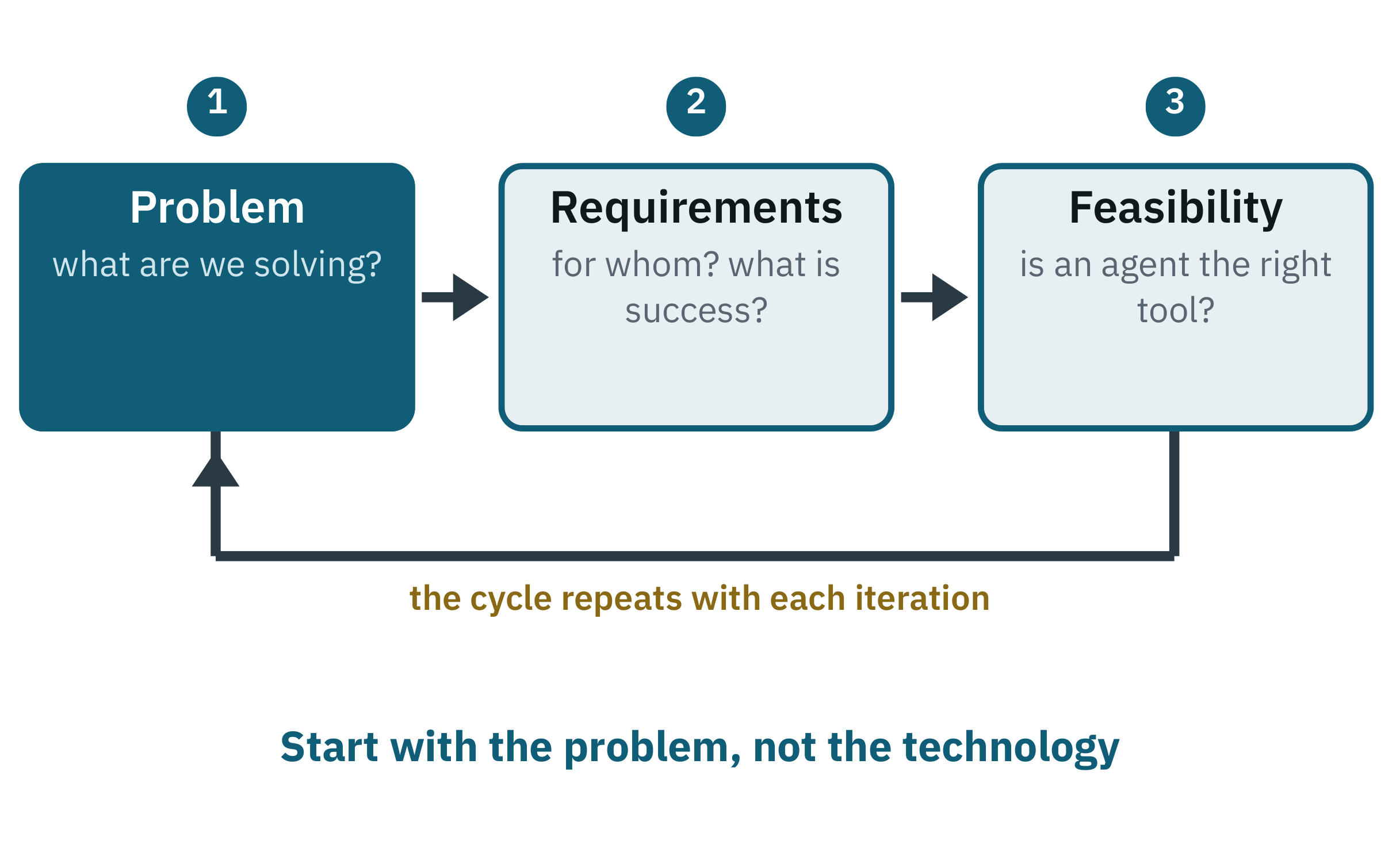
It is like hiring an assistant. You would not say “go help someone” and push them into the office. You would ask: what needs doing, who needs it, and is this a job for a person or for a checklist?
Define the problem
“We need an AI assistant” is not a problem statement. This is:
Our support team spends too much time resetting passwords. We want that handled without them.
Specific, measurable, tied to an outcome.
Clarify what success looks like
Who is it for, and what exactly should it do? Then say what “working” means:
A user can reset their password through a conversation, without a human agent. It works around the clock and takes under two minutes.
Notice that this is testable. If you cannot write a sentence like that, you are not ready to build.
Check whether it needs an agent at all
Sometimes a problem sounds like it needs AI when a script or a form would do it better, faster and more cheaply. Six questions will usually settle it.
Mostly yes: build the agent. Mostly no: build something simpler and spend the savings elsewhere. Mixed: build the narrowest possible version and test it before committing.
The fourth question is the one that catches most people. Predictable logic belongs in predictable software. An agent is for the cases where the shape of the request is not known in advance.
Designing the agent
Once the problem fits, design the agent the way you would brief a new colleague. What is the job? What may they touch? What do they need to know?
Five decisions cover it, and they spell AGENT.
Table 7-1: The AGENT blueprint
| Decision | The question it answers | |
|---|---|---|
| A | Assignment | What is the job, and where does it end? |
| G | Guidance | What instructions shape how it behaves? |
| E | Engine | Which model drives it? |
| N | Needs | Which tools and data, with what permissions? |
| T | Tracking | What must the agent remember, and for how long? |
A — Assignment
Write the job description. This sets boundaries and prevents the scope creep that kills most agent projects.
You are a travel assistant. Your job is to help users find flights, compare hotels and schedule meetings around their trips.
Resist making one agent do everything. A narrow brief is the single strongest predictor of an agent that works.
G — Guidance
How it should behave. You need instructions defining its role and its limits, and separate ones for the reasoning, planning and acting stages.
You are TravelBooker, an assistant that finds flights and schedules meetings. Always check the traveller's stored preferences first. Never complete a purchase or send an external message without explicit confirmation.
That last sentence is doing real work. It is the Chapter 6 checkpoint written into the agent's own instructions — though as we will see in Chapter 15, an instruction is weaker than a permission boundary, and serious systems use both.
E — Engine
Choose a model to fit the need and the constraints. Think in categories rather than rankings, because the products change faster than any book can track.
Table 7-2: Categories of model, and what each is for
| Category | What it suits |
|---|---|
| Most capable available | Hard reasoning, planning, long context |
| Mid-range | Most production work, where cost and speed matter |
| Small and fast | Classification, routing, high-volume simple steps |
| Your own fine-tuned model | House style, strict formats, narrow domains |
| Open-weight, run locally | Privacy-sensitive or cost-sensitive work |
You rarely need the largest model. You need the right one. A common and effective arrangement is to mix them: a capable model for planning, a cheaper one for the repetitive steps. Part V shows how far that idea goes.
N — Needs
What the agent must touch to do the job: a flight service, a calendar, a store of documents. Start with what the first version genuinely requires and nothing more.
Decide permissions at the same time, not later. For each tool ask: can the agent read, write, or delete? Most tools should be read-only until there is a specific reason otherwise. This is the cheapest safety decision available to you, and it is made in about thirty seconds.
T — Tracking
What it needs to hold within a session, and what is worth keeping between them. An interview agent that recalls a candidate's earlier answers does not ask the same question twice. A travel assistant that remembers the window seat stops asking. Both are small features that make an agent feel competent rather than mechanical.
Be deliberate rather than generous here. Everything you store about a person is something you are now responsible for, which is a Chapter 15 problem you can avoid creating.
What works, and what does not
Patterns that hold up
One clear job. Start with a single task the agent must do. It keeps users, developers and stakeholders aligned, and it makes success measurable. An onboarding agent that schedules tasks, not one that attempts all of HR.
Defined inputs and outputs. When the agent takes a specific kind of request and reliably returns something useful, people trust it. Avoid open-ended agents early.
A person in the loop by default. In early versions, let people review or approve what the agent does, especially in finance, legal or support. This is not a weakness in the design; it is part of it. It builds trust, provides a safety net, and generates exactly the feedback that improves the system.
Start narrow, then widen. Ship a focused use case that delivers visible value, then build on it. Start with scheduling interviews; add candidate follow-up later.
Go where the users already are. Do not build a new interface if you do not need one. Put the agent in the chat tool, the mail client, the help desk. Adoption follows familiarity.
Patterns that fail
The do-everything agent. Vague goals like “help with anything” are hard to test, hard to trust, and leave users unsure when to use it.
No business outcome. If it is not tied to saved time, reduced cost or a better experience, it will not survive contact with a budget.
Automating critical paths too early. Removing people from sensitive workflows before the agent has been properly tested is how projects become incidents. Keep the review steps in healthcare, finance, legal and security.
No owner. Agents are not build-once-and-forget. Data changes, tools change, interfaces get deprecated. Somebody must be accountable for how it behaves.
No user testing. Agents built in isolation miss the mark almost every time. Even a handful of real users will tell you more than a month of internal review.
Key takeaways
- Start with a clear problem, not with the technology.
- Ask whether the task needs judgement. Sometimes the answer is a script.
- Use the AGENT blueprint: assignment, guidance, engine, needs, tracking.
- Decide tool permissions when you decide tools, and default to read-only.
- Think in categories of model, not rankings. The products change.
- One valuable task done well beats five done poorly.
- Keep a person in the loop while trust is being earned.
- Agents are living systems. They need an owner.
A blueprint is not a working system, though. Somebody has to choose the model, decide where memory lives, connect the tools and put the whole thing somewhere users can reach it. Those choices are the difference between a design and something running.